Use Cases

Built Around the Way Detailing Businesses Actually Work.

Whether you operate alone, work from a mobile setup, or run a growing detailing shop, DetailGrid connects the customer, vehicle, estimate, schedule, invoice, and payment workflows that move each job forward.

Built for focused detailing operations

01Owner-Operators02Mobile Detailers03Small Detailing Shops04Small Detailing Businesses

Solo Owner-Operators

Run the Whole Business Without Losing Track of the Work.

When one person handles detailing, customer communication, scheduling, estimates, invoices, and payments, every repeated administrative step takes time away from paid work. DetailGrid keeps those records connected without requiring an oversized enterprise system.

Common challenges

  • Customer information spread across messages and notes
  • Rebuilding estimates and invoices manually
  • Remembering upcoming work and unpaid balances
  • Switching between multiple unrelated tools

How DetailGrid helps

  • Customer and vehicle profiles
  • Reusable service pricing
  • Professional estimates and invoices
  • Calendar and appointment visibility
  • Online and manually recorded payments
  • Basic business reporting

Run a professional operation without needing a separate system for every part of the job.
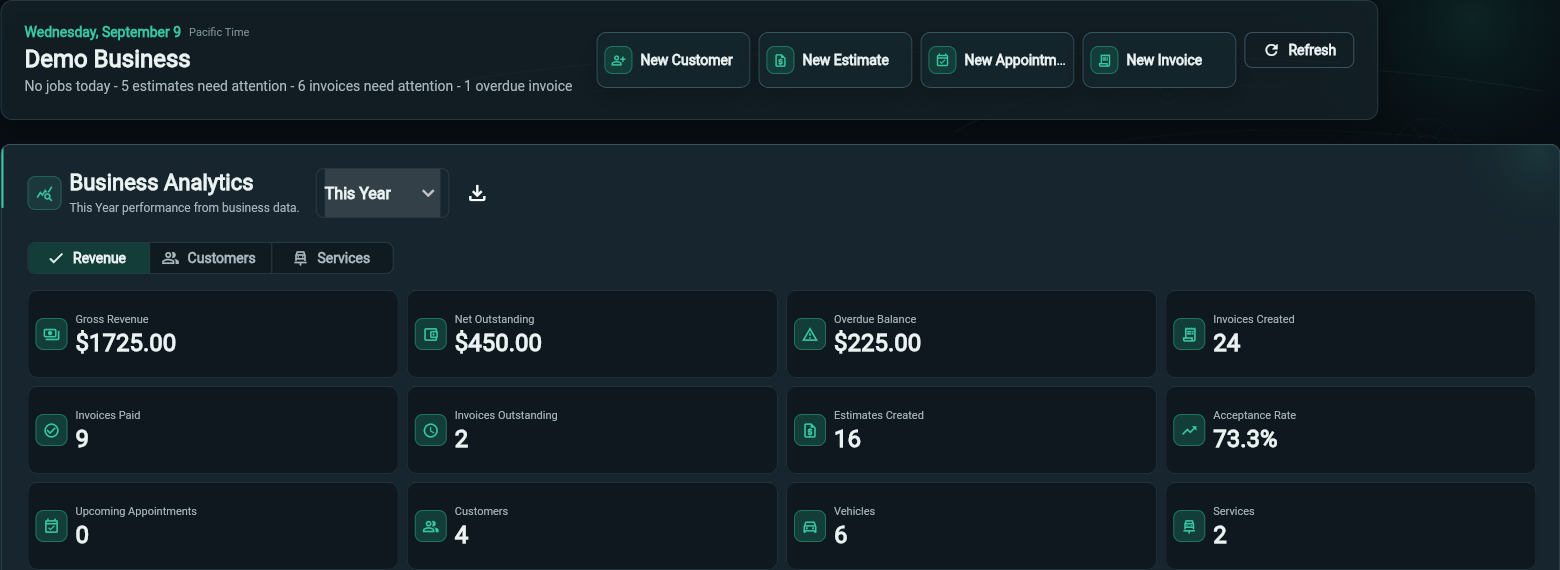
Dashboard work summary, quick actions, and business metrics for Demo Business
Dashboard · Work summary and quick actions Actual app screenshot · Demo data shown View full-size

Mobile Detailers

Keep the Business Organized Wherever the Work Takes You.

Mobile detailing businesses need access to customer, vehicle, schedule, and payment information without relying on paper notes or returning to one office computer. DetailGrid's responsive browser experience keeps the active workflow available from a laptop, tablet, or mobile browser.

Common challenges

  • Customer details stored in text-message threads
  • Changing daily locations
  • Sending estimates away from an office
  • Tracking which invoices have been paid

How DetailGrid helps

  • Responsive browser-based workspace
  • Customer and vehicle history
  • Proposed and confirmed appointment times
  • Secure estimate and invoice links
  • Online card payments
  • Manual payment recording
  • Realtime status updates

Keep the day moving while customer and payment records stay connected to the correct job.

Weekday calendar cells for August 3 through 21 with interior and exterior detail appointments
Calendar · Weekday appointment detail Actual app screenshot · Demo data shown View full-size

Small Detailing Shops

Give the Front Desk and the Work Schedule One Source of Truth.

A small shop needs a clear way to move customers from an approved estimate into scheduled work, invoicing, and payment. DetailGrid keeps those stages connected so the business can see what is pending, confirmed, issued, paid, or overdue.

Common challenges

  • Scheduling separate from approved work
  • Inconsistent service pricing
  • Collecting payments at the counter
  • Following up on unpaid invoices

How DetailGrid helps

  • Services, packages, and add-ons
  • Pending and confirmed appointments
  • Invoice issuing without requiring email
  • Email, print, PDF, and secure invoice links
  • Record Payment or Charge Card options
  • Payment history and remaining balances
  • Overdue invoice visibility

Move work through the shop with fewer disconnected handoffs.

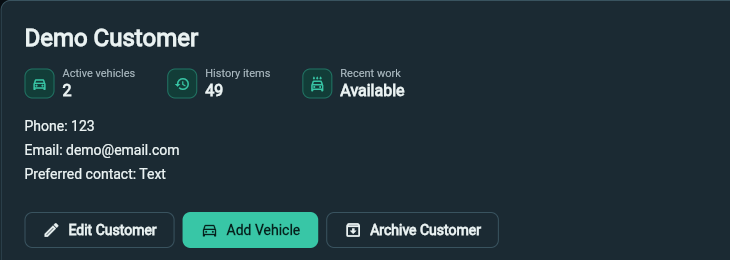
Demo Customer summary with active vehicles, history count, and customer actions
Customers · Selected record and linked vehicles Actual app screenshot · Demo data shown View full-size
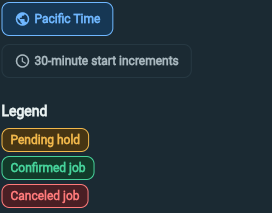
Calendar legend with Pacific Time, 30-minute start increments, and pending, confirmed, and canceled statuses
Calendar · Timezone and appointment status Actual app screenshot · Demo data shown View full-size

Growing Businesses

Stay Consistent as Customer Volume Increases.

As the business adds customers, vehicles, services, appointments, and invoices, searching through long static lists and rebuilding information becomes harder. DetailGrid provides repeatable workflows and business visibility without changing the fundamentals of how the operation already works.

Common challenges

  • Larger customer and vehicle lists
  • Repeated service setup
  • More outstanding invoices
  • Harder-to-see performance trends

How DetailGrid helps

  • Searchable customer and vehicle selectors
  • CSV customer and service imports
  • Reusable service and package catalog
  • Connected estimate-to-invoice workflow
  • Outstanding and overdue balance tracking
  • Top-customer and top-service reporting
  • Date-filtered business analytics

Keep the workflow predictable as the volume of work grows.

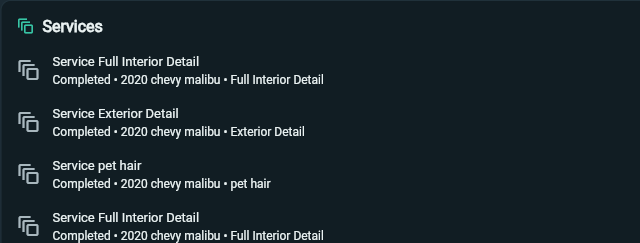
Completed interior and exterior services associated with the demo customer’s 2020 Chevy Malibu
Customers · Recorded service history Actual app screenshot · Demo data shown View full-size

High-Value Services

Present Complex Work Clearly and Track Every Dollar.

Paint correction, ceramic coating, multi-day details, and service packages often require clearer estimates, longer schedules, and more deliberate payment tracking. DetailGrid keeps the selected work, proposed time, invoice, and payment history attached to the same customer and vehicle.

Common challenges

  • Paint correction
  • Ceramic coating
  • Multi-day detailing
  • Interior and exterior packages
  • Maintenance details

How DetailGrid helps

  • Service packages and add-ons
  • Vehicle-specific pricing and duration
  • Custom estimate lines
  • Proposed appointment ranges
  • Multi-day scheduling
  • Partial-payment architecture
  • Payment history
  • Remaining-balance calculations

Give higher-value work the professional presentation and financial visibility it deserves.

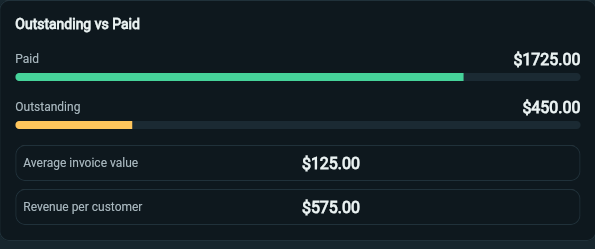
Outstanding versus paid balances, average invoice value, and revenue per customer in the demo dashboard
Dashboard · Outstanding versus paid Actual app screenshot · Demo data shown View full-size

One Operational Foundation

Different businesses. One connected workflow.

The day looks different for a solo mobile detailer and a growing shop, but the customer, vehicle, estimate, appointment, invoice, payment, and reporting still need to move together.

See how DetailGrid fits your business.

Start with the tools needed to organize today’s work and keep the same connected workflow as the business grows.

Start with a 7-day trial. Card required.